

Table of Contents
- Why Start with Affordable Smart Home Gadgets
- Best Smart Home Devices Under $50
- Smart Home Compatibility Guide for Beginners
- How to Set Up a Smart Home Ecosystem on a Budget
- Privacy and Security in Budget Smart Homes
- Hidden Costs and Long-Term Considerations
- Common Mistakes Beginners Make
- Conclusion
Last Updated: August 11, 2026
Why Start with Affordable Smart Home Gadgets
Building a smart home doesn't require massive upfront investment. Entry-level affordable smart home gadgets now deliver genuine functionality at accessible prices for beginners.
Start strategically with a single category, smart plugs, lighting, or motion sensors, and expand from there. This approach lets you understand how devices work, test compatibility before committing to a full ecosystem, and avoid overspending on features you don't need.
At The Daily Drop by Ed Rivera, we understand that budget-conscious homeowners want real value without compromise. We focus on helping you find affordable smart home gadgets that deliver practical automation without breaking the bank. The real advantage of starting small is learning which automation routines actually improve your daily life and where gaps exist in your setup.
Best Smart Home Devices Under $50
Smart home automation at budget prices is entirely achievable. These devices handle the most common use cases: controlling lights, managing power draw, detecting motion, and enabling voice commands.
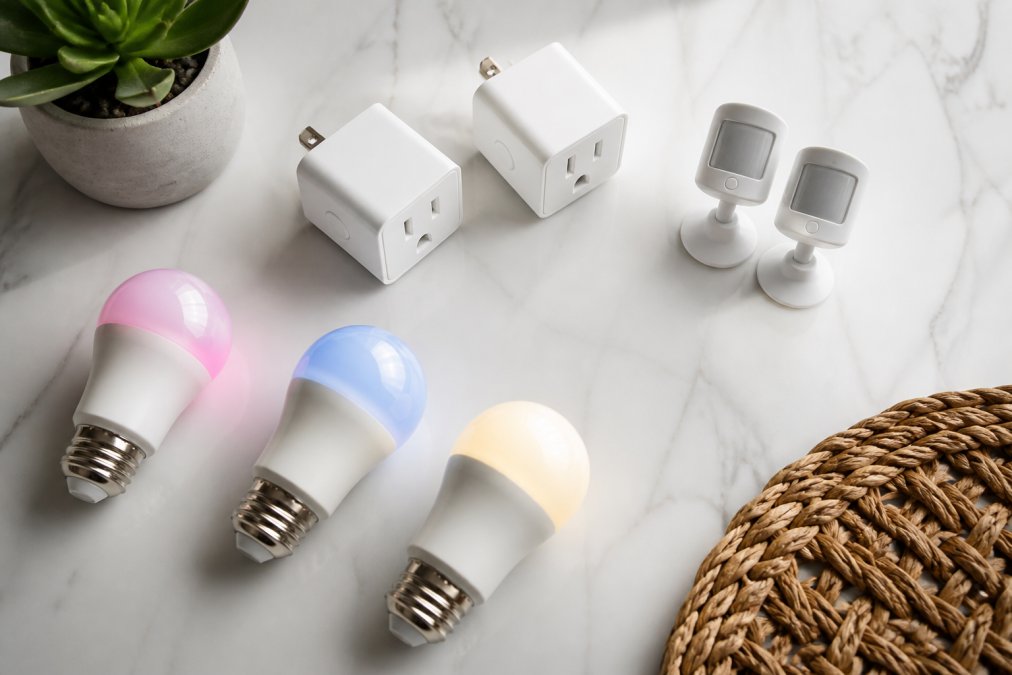
Smart Plugs and Power Management
Smart plugs convert any standard outlet into a controllable connection point. Plug in a lamp, fan, coffee maker, or any device with a power cord, and suddenly you can turn it on and off from your phone or with a voice command.
Set routines to turn off entertainment systems at night, schedule the coffee maker to start brewing before you wake up, or control devices remotely when away from home. Many smart plugs also monitor energy consumption, showing which devices draw the most power.
Most entry-level smart plugs work with both Amazon Alexa and Google Assistant, connecting via WiFi with simple app setup taking under five minutes. Start with two or three plugs in high-traffic areas where you'd genuinely benefit from remote control or scheduling rather than plugging in every outlet simultaneously.
Smart Lighting and Bulbs
Smart bulbs replace existing bulbs and integrate directly into light fixtures, creating a more seamless experience than plug-on devices. Entry-level smart bulbs offer color options and brightness control, letting you dim lights for movie watching or set warm tones in the evening. Many support scheduling so lights gradually brighten in the morning or turn off automatically at midnight.
Setup mirrors smart plugs: screw in the bulb, download the app, connect to WiFi, and assign a name. Smart bulbs require a standard socket and don't work with all dimmer switches, so check compatibility before purchasing. Most beginners start with one or two smart bulbs in commonly-used rooms like bedrooms or living rooms.
Motion Sensors and Entry-Level Automation
Motion sensors detect movement and trigger actions. When someone enters a room, lights turn on automatically. When motion stops for a set period, lights turn off. This automation works remarkably well for entry-level setups.
Motion sensors pair with smart bulbs or smart plugs to create automation routines. A hallway motion sensor can trigger hallway lights automatically at night. A bathroom sensor can turn on exhaust fans. Garage sensors can illuminate the space when the garage door opens.
Most motion sensors require batteries with life typically ranging from six months to two years depending on activity levels. Setup involves mounting the sensor (usually adhesive-backed), pairing it with your hub or app, and defining what actions it triggers. Start with one motion sensor in a high-traffic area like a hallway or bathroom to learn how automation routines work.
Smart Home Compatibility Guide for Beginners
The biggest frustration beginners encounter is device incompatibility. Understanding compatibility before purchasing prevents these problems.
Understanding Wireless Protocols and Matter
Devices communicate using different wireless standards. WiFi-based devices connect directly to your home network. Zigbee and Z-Wave devices require a hub to relay commands. Bluetooth devices work within close range.
WiFi devices are easiest to set up initially with no hub required, though WiFi can be congested in homes with many connected devices. Zigbee and Z-Wave devices are more power-efficient and create mesh networks where devices relay signals through each other, but require a hub.
Matter is a newer protocol designed to improve interoperability across different brands and platforms, creating a universal standard so a Matter-certified device works with Matter-certified hubs from different companies. When shopping for affordable smart home gadgets, check what protocol each device uses and ensure you have necessary hubs or that devices support your chosen platform.
Building a Unified Ecosystem
An ecosystem is a collection of devices that work together through a central platform. Amazon Alexa, Google Home, and Apple HomeKit are the major ecosystems. Most affordable smart home gadgets work with at least one of these platforms.
The advantage of a unified ecosystem is controlling all devices from one place, creating routines involving multiple devices, and using voice commands across everything. The downside is lock-in, if you choose Amazon Alexa initially and later want to switch to Google Home, some devices may not transfer cleanly.
Most households already have a smartphone connected to one of these ecosystems. If you use Android, Google Home integration is natural. If you use an iPhone, Apple HomeKit is the obvious choice. Alexa works across both, making it the most flexible option for mixed-device households. Choose your ecosystem first, then select devices compatible with it.
How to Set Up a Smart Home Ecosystem on a Budget
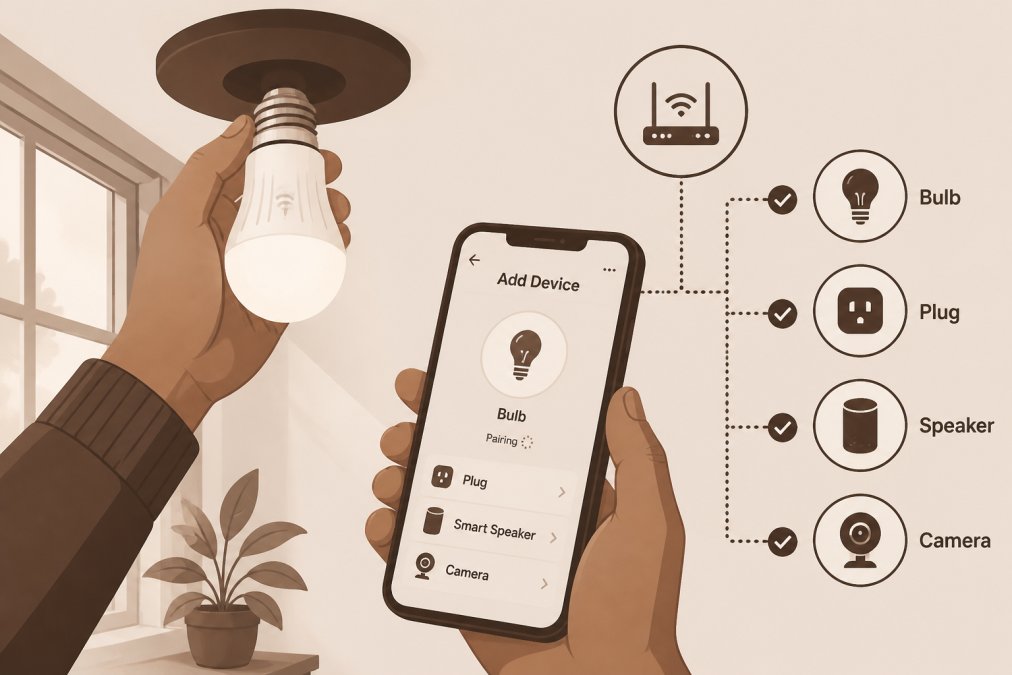
Setting up your first smart home ecosystem follows a logical sequence. Most people can complete a basic setup in under an hour.
Choosing Your Smart Hub
Your hub is the central coordinator of your smart home, handling communication between your phone, voice assistant, and devices. For budget setups, this is often a device you already own.
If you have an Amazon Echo speaker, that's your hub. If you have a Google Home speaker, that's your hub. If you have an Apple TV or HomePod, that's your hub. Most people don't need to buy a separate hub device when starting out. If you don't have any smart speaker, an entry-level Echo Dot or Google Home Mini is affordable and sufficient for a beginner setup.
Device Pairing and Initial Setup
Device pairing is the process of connecting a new device to your ecosystem. Download the device manufacturer's app or use your ecosystem's app. Put the device into pairing mode by pressing a button or holding it until a light blinks. Open your ecosystem app, select "add device," and the app scans for nearby devices. Select your device from the list, connect it to your home WiFi, and give it a name. Test the device to confirm successful pairing. The entire process typically takes five to ten minutes per device.
Creating Automation Routines
Automation routines are sets of actions triggered by specific events. A practical first routine is simple: "When I say 'movie time,' dim the living room lights to 30 percent and turn off the hallway lights." This requires a smart bulb and a voice command trigger, taking three minutes to set up.
A second routine might be time-based: "Every weekday at 6:30 AM, turn on the bedroom light to 50 percent brightness." Start with simple routines with one or two actions. As you understand how they work, add complexity.
Privacy and Security in Budget Smart Homes
Smart devices collect data about your home and habits. Most mainstream devices from Amazon, Google, and Apple have reasonable privacy practices with encrypted data in transit and privacy settings in their apps. Smaller manufacturers are less transparent, which is worth considering when evaluating options.
Review app permissions before installing. Does the motion sensor app really need access to your camera? Denying unnecessary permissions reduces data collection without losing functionality. Use strong passwords on all accounts and enable two-factor authentication if your ecosystem offers it. Update device firmware when updates become available.
Local control, where devices work without internet connection, provides both privacy and reliability benefits. Accept that some data collection is inherent to smart homes and focus on choosing platforms with transparent practices.
Hidden Costs and Long-Term Considerations
The initial purchase price is only part of the cost. Subscription fees are common for advanced features or cloud storage. Battery replacement is ongoing for motion sensors, door sensors, and remotes. Device replacement happens as smart bulbs or motion sensors fail after several years. Smart plugs consume small amounts of power even when devices are off. Expect to spend several hours setting up devices, troubleshooting connections, and creating routines.
Common Mistakes Beginners Make
The biggest mistake is buying too much too fast. Purchase two or three devices, use them for a month, then evaluate what to add next. Check compatibility before purchasing to avoid incompatibilities. Keep initial routines simple with one or two actions rather than complex ones that fail occasionally. Review privacy settings in your ecosystem app. Enable automatic firmware updates or check monthly for manual updates. Accept that smart home devices are reliable but not flawless, occasional connection issues are normal.
Conclusion
Building a smart home doesn't require expensive equipment or complex technical knowledge. Affordable smart home gadgets now deliver genuine automation at prices that make sense for beginners.
The Daily Drop by Ed Rivera specializes in helping you find real value in everyday products, including smart home devices that fit your budget. With our curated selection of affordable gadgets and regular deals on smart home essentials, you can build a functional automation setup without overspending. Start small, learn the fundamentals of device compatibility and ecosystem integration, and expand as your confidence grows. That's how beginners build smart homes that actually deliver on the promise of convenience and efficiency.
Frequently Asked Questions
What is the best way to start a smart home on a budget?
Begin with one affordable smart home device, a smart plug or bulb, to test the ecosystem before expanding. Choose a hub or voice assistant that supports multiple device brands through Matter protocol to avoid vendor lock-in. Start with plug-and-play devices that require minimal setup, and prioritize automation routines that save energy or time. Avoid subscription services initially and research which devices offer local control instead of cloud-only operation.
Do I need a smart home hub for beginners?
Not always. Some affordable smart home gadgets like smart plugs and bulbs work directly with voice assistants through Wi-Fi. However, a hub improves reliability, enables remote access, and allows more complex automation routines. Budget-friendly hubs are available, and many voice assistants double as hubs, making them a practical starting point for building a cohesive ecosystem.
Are cheap smart home devices safe to use?
Budget-friendly smart home devices can be safe if they support encryption and regular firmware updates. Check that devices use secure wireless protocols and avoid those requiring weak passwords. Research the manufacturer's privacy policy and look for devices with local control options rather than cloud-only operation. Reputable budget brands often meet security standards, but always verify encryption capabilities and update availability before purchasing.
Which affordable smart home devices are most worth the money?
Smart plugs and smart bulbs offer the best value for beginners because they're inexpensive, easy to install, and deliver measurable energy savings. Voice-activated assistants provide central control and automation capabilities. Smart thermostats save on heating and cooling costs over time. Motion sensors enable automated lighting and security routines. Prioritize devices that integrate with your chosen platform to build a unified ecosystem without compatibility headaches.
What are the hidden costs of building a smart home?
Many smart devices require subscription services for advanced features, cloud storage, or remote access. Some manufacturers charge for firmware updates or premium automation routines. Energy costs for always-on devices add up, though smart thermostats and plugs typically offset this. Replacement and maintenance costs accumulate as devices age. Plan for periodic hub upgrades to stay compatible with new protocols like Matter. Budget for these ongoing expenses, not just initial hardware purchases.
How do I ensure my smart home devices work together?
Look for devices supporting the Matter protocol, which improves interoperability across brands. Choose gadgets compatible with your selected voice assistant or hub platform. Check product specifications for wireless protocol support (Wi-Fi, Zigbee, Z-Wave). Test compatibility before bulk purchases by reading user reviews about integration issues. Start with devices from the same ecosystem, then gradually add others as you understand your setup's capabilities and limitations.
This article was written using GrandRanker