

Table of Contents
- What Are Matter Smart Home Devices?
- Benefits of Matter Smart Home Standard
- Best Matter Smart Home Hub Options
- Top Matter-Compatible Devices for Beginners
- How to Set Up Matter Devices
- Building Your First Matter Smart Home on a Budget
- Frequently Asked Questions
Last Updated: September 1, 2026
What Are Matter Smart Home Devices?
Matter smart home devices are connected gadgets that use the Matter wireless protocol to communicate with each other and your smart home controller. Unlike older smart devices requiring proprietary apps and hubs, Matter devices work across multiple ecosystems, Apple Home, Google Home, Amazon Alexa, and Samsung SmartThings all support the same standard.
The Matter protocol solves a real problem. For years, buying a smart light meant committing to one ecosystem. Matter eliminates that friction. Buy what makes sense for your budget and use case, not what matches your phone's operating system.
At The Daily Drop by Ed Rivera, we focus on helping budget-conscious shoppers find quality smart home gear without overpaying. Matter devices fit perfectly into that mission because they're becoming the affordable entry point into home automation.
The technical foundation matters here. Matter uses Thread, a low-power mesh networking protocol, to create a more reliable local network (threadgroup.org). Your devices respond faster and work even if your internet connection drops. Wi-Fi-based smart devices can lag or fail entirely when bandwidth is tight. Matter devices with Thread don't have that problem.
Benefits of Matter Smart Home Standard
The biggest advantage of the Matter standard is interoperability. A Nanoleaf bulb, an Eve Energy plug, and a TP-Link sensor can all work together in the same automation, controlled from the same app. That flexibility saves money because you can buy the best device for each use case rather than settling for second-rate options from your chosen ecosystem.
Reliability improves significantly with Thread-enabled Matter devices. Thread creates a mesh network where devices relay signals through each other, extending range and reducing dead zones. Response times drop from seconds to milliseconds.
Local control is another meaningful benefit. Many Matter devices work even when your internet is down, as long as your hub is powered. Your automation continues running. Your voice commands still work. Compare that to cloud-dependent devices that become paperweights during an outage.
Standardization reduces complexity in your smart home. Instead of learning three different app interfaces, you get consistency. The setup process is similar across brands. New users find this dramatically less intimidating than the fragmented landscape of five years ago.
Future-proofing is built in. As Matter adoption grows, device prices are falling and options are expanding. Manufacturers are investing in Matter because they know it's becoming the industry standard. Buying Matter now means your investment stays relevant for years.
Best Matter Smart Home Hub Options
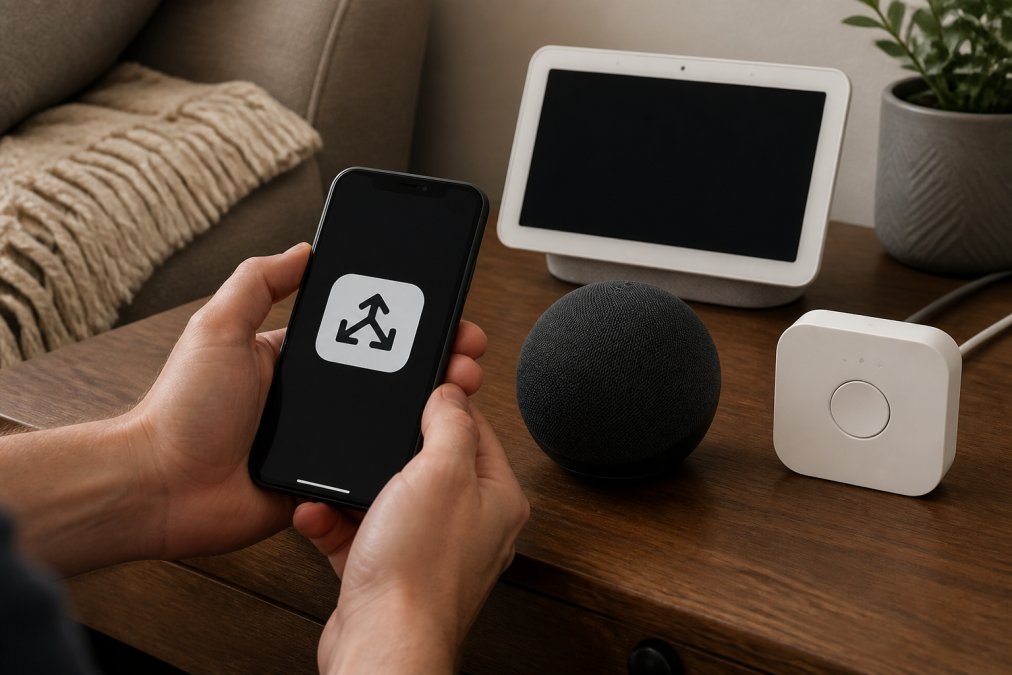
A Matter hub is non-negotiable. It's the central controller that manages all your Matter devices and enables remote access from your phone. Without it, you can control devices locally when you're home, but automations won't run and remote access won't work. The hub also functions as a Thread border router, strengthening your mesh network.
Google Nest Hub (2nd Gen)
The Google Nest Hub (2nd Gen) is the best hub option for beginners prioritizing simplicity and affordability. It combines a 7-inch touchscreen, Matter hub functionality, and Thread border router capabilities in one device. Setup takes minutes, scan a QR code in the Google Home app, and you're connected.
The touchscreen gives you visual control that voice-only devices lack. You can see your automations, adjust temperature, or check camera feeds without speaking. Google's ecosystem integration is seamless. If you already use Google services or Android devices, the Nest Hub feels natural.
The tradeoff is privacy. Google collects usage data, and the always-on microphone bothers some users. The device also requires a Google account for full functionality.
Amazon Echo (4th Gen)
The Amazon Echo (4th Gen) is the best hub for Alexa-first households. It's a smart speaker with a spherical design, premium audio, and all the Matter hub and Thread capabilities you need. Echo's real strength is Alexa's voice recognition. If you're already using Alexa devices throughout your home, adding a Matter hub that speaks the same language eliminates friction.
Like the Nest Hub, the Echo requires an Amazon account and has privacy implications around always-on listening. The tradeoff is that Alexa's voice capabilities are genuinely strong.
Philips Hue Bridge
The Philips Hue Bridge is the best hub if you're already invested in Philips Hue lighting. It's a small, unobtrusive box that connects via ethernet or Wi-Fi and enables Matter compatibility for all your Hue products. All your existing Hue bulbs become Matter-compatible through a firmware update.
The drawback is that you still need a separate device for voice control and general smart home management. This works fine if you're building a lighting-first smart home, but it adds complexity for beginners.
Top Matter-Compatible Devices for Beginners
Start small and expand gradually. Pick one category, lighting, plugs, or sensors, and add three to five devices before moving to the next category. This approach prevents overwhelming yourself with too many automations.
Smart Plugs: Eve Energy and TP-Link Tapo P125M
Smart plugs are the easiest entry point into home automation. Plug one in, connect it to your hub, and suddenly any "dumb" device becomes smart. Plug in a coffee maker, and you can turn it on from bed. No wiring, no installation, no technical knowledge required.
The Eve Energy Smart Plug is the premium option. The energy monitoring feature justifies the price if you care about power consumption. The app shows real-time watts, daily usage, and historical trends. Thread support means faster response times than Wi-Fi-only plugs.
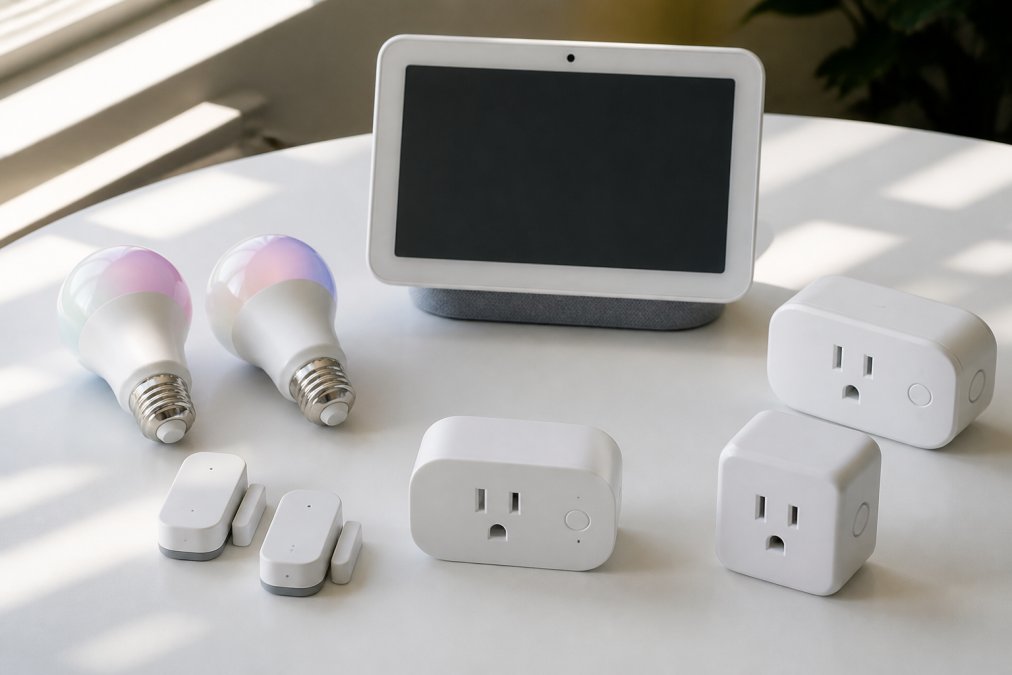
The TP-Link Tapo P125M Mini is the budget-friendly choice. It's smaller than the Eve plug, so it won't block adjacent outlets. Matter certification means broad compatibility. You lose the energy monitoring, but you gain affordability and a compact form factor. For beginners, this is the smarter choice.
Smart Lighting: Nanoleaf Essentials and LIFX A19
Smart bulbs let you control color, brightness, and scheduling for any light fixture. Color-changing bulbs add ambiance and can create automations tied to time of day or events.
The Nanoleaf Essentials A19 Matter Bulb is the best for color and customization. It supports 16 million colors and includes dynamic scenes that respond to music or time of day. Circadian lighting automatically shifts from warm in the evening to cool in the morning, which helps regulate sleep (peer-reviewed research). Setup requires a Matter hub with Thread, but once connected, the bulb is incredibly responsive.
The LIFX Matter Smart Light Bulb A19 is simpler and more affordable. It's Matter-enabled out of the box with no firmware update required. Setup is faster. You get 16 million colors and tunable white light, but fewer dynamic features than Nanoleaf. LIFX relies on Wi-Fi rather than Thread, so response times can be slightly slower in congested networks.
Smart Sensors and Thermostats
Sensors detect motion, temperature, humidity, and door/window status. They're the foundation of automations, a motion sensor can trigger lights, a door sensor can alert you if someone enters, a temperature sensor can adjust your thermostat.
The Aqara Door and Window Sensor P2 is the best entry-level sensor. It's tiny, adhesive-mounted (no drilling), and Matter-compatible. Setup takes seconds. You get instant alerts when doors or windows open, and you can build automations around those events. The battery lasts months.
The Google Nest Learning Thermostat (3rd Gen) is the best smart thermostat for energy savings (store.google.com). It learns your schedule and temperature preferences, then automatically adjusts heating and cooling. The app shows energy usage and savings over time. Matter compatibility means it works across platforms. Installation requires a C-wire, which some older homes lack, check before buying. The energy savings often justify the price within a year.
How to Set Up Matter Devices
Before You Start
Gather these essentials: a Matter hub, a smartphone with the hub's app installed, and your Wi-Fi network password. Ensure your hub is plugged in and connected to power and your home network. Download the app for your hub (Google Home, Alexa, or Philips Hue) and log in.
Check your Wi-Fi strength where you plan to place devices. Have your Matter device's setup code ready, it's printed on the device, the box, or the manual.
Step-by-Step Setup Process
Step 1: Open Your Hub's App Launch Google Home, Alexa, or the Philips Hue app. Tap the plus icon or "Add Device" button. Select "Add Matter Device" or similar. The app will activate your phone's Bluetooth to scan for nearby Matter devices.
Step 2: Scan or Enter the Setup Code Hold your new device near your phone. Most devices display a QR code or an 8-digit setup code. Scan the QR code with your app, or manually enter the code.
Step 3: Connect to Your Network The app will ask which Wi-Fi network the device should join. Select your home network and enter the password. The device connects and registers with your hub, typically in 30 seconds to 2 minutes.
Step 4: Name and Assign the Device Give the device a descriptive name (e.g., "Living Room Light" instead of "Light 1"). Assign it to a room so automations and voice commands work logically.
Step 5: Test the Device Use your app to turn the device on and off. Test voice commands if your hub supports them.
Troubleshooting Common Setup Issues
Device Won't Connect Restart your hub and your phone. Ensure the device is powered and close to the hub. Check that your Wi-Fi network is 2.4GHz (many Matter devices don't support 5GHz). If the setup code is damaged, contact the manufacturer for a replacement.
Device Connects but Responds Slowly Move the device closer to the hub. If you have a Thread-enabled hub, the device will eventually join the Thread mesh and respond faster. Disable 5GHz Wi-Fi temporarily to force the device to use 2.4GHz, which has better range.
Device Disappears After Setup The device lost connection to the hub. Check that your hub is powered and connected to the internet. Restart the hub. Open your app and see if the device reappears. If not, remove the device from the app and set it up again.
Can't Control Device from Away Your hub needs an internet connection to enable remote access. Check that your hub is connected to Wi-Fi and has internet access. Log out and back into your app. If the problem persists, restart your hub and your phone.
Building Your First Matter Smart Home on a Budget
Start with the essentials: a Matter hub and two to three devices in one category. A Google Nest Hub (2nd Gen) with two TP-Link Tapo smart plugs costs less than many standalone smart devices from five years ago. You get a touchscreen controller, voice commands, and the ability to make two appliances smart immediately.
Add one smart lighting device next. A single Nanoleaf Essentials or LIFX bulb in your bedroom or living room lets you experience color automation and scheduling before you commit to lighting your entire home.
Once you're comfortable, expand systematically. Add one device per week rather than buying everything at once. This approach prevents decision fatigue and spreads costs over time.
The Daily Drop by Ed Rivera regularly updates inventory with smart home deals that help you expand affordably. Check back often for discounted Matter devices and hubs, pricing changes frequently, and new options appear regularly.
Focus on automations that solve real problems. A motion-sensor light in a hallway saves you from fumbling in the dark. A smart plug on your coffee maker means hot coffee waiting when you wake up. A door sensor alerts you if someone enters when you're away. These automations improve daily life.
Thread networking grows as you add more devices. Once you have five or six Thread-enabled devices, they form a mesh that strengthens the entire network. This is why it's worth choosing at least some Thread-capable devices even though they cost slightly more, the network benefit compounds.
===
Frequently Asked Questions
Q: Do I need a hub for Matter-compatible devices?
A: Most Matter devices require a hub or border router to function properly. Hubs like the Google Nest Hub, Amazon Echo, or Philips Hue Bridge act as the central control point and enable Thread connectivity for faster, more reliable communication. Without a hub, many Matter devices cannot connect to your network or respond to commands.
Q: What is the cheapest way to start a Matter-enabled smart home?
A: Start with an affordable hub like the TP-Link Tapo P125M smart plug paired with budget-friendly Matter devices. The Nanoleaf Essentials A19 bulb and TP-Link Tapo smart plugs offer excellent value. Check The Daily Drop by Ed Rivera for current pricing on these devices, as inventory and deals change regularly.
Q: Can I mix and match different brands with Matter devices?
A: Yes, one of Matter's key benefits is interoperability. You can combine devices from Eve, Nanoleaf, TP-Link, LIFX, Aqara, and other brands on the same network. Matter acts as a universal language, allowing different manufacturers' devices to work together seamlessly across Apple Home, Google Home, Amazon Alexa, and Samsung SmartThings.
Q: What are the benefits of choosing Matter-certified devices?
A: Matter-certified devices offer cross-platform compatibility, meaning they work with multiple smart home ecosystems without vendor lock-in. They provide faster response times through Thread networking, improved local control for privacy, stronger encryption for security, and better reliability. You're not limited to one brand's ecosystem, giving you more flexibility and choice.
Building a smart home doesn't require expensive ecosystems or technical expertise. Matter devices make it accessible and affordable. Start with a hub and two or three devices from The Daily Drop by Ed Rivera's curated selection, then expand as your comfort grows. The right devices, chosen for your specific needs rather than brand loyalty, make home automation feel natural and useful rather than gimmicky.
This article was written using GrandRanker